

 The number of people upgrading their homes to “smart homes” continues to grow, and one of the fastest, easiest and cheapest ways to make the switch is to start with smart light bulbs. Smart light bulbs are useful because, depending on the model, they are able to automatically change colour and brightness, save energy by letting you manage them on schedules, be controlled from anywhere by an app or your voice. I’m a huge fan of smart lighting and the newest smart bulbs I’m trying, and I’ve reviewed a LOT so far, is the Wyze Bulb Colour. In this review I’ll take a look at what you need to get these lights set up, how easy it is, or not to control and schedule them using the Wyze app, what colour and brightness intensity is like, how well voice control works, and if overall I think they are a good integration into your smart home.
Wyze Bulb Colour
Summary
Overall I think these bulbs are a super value and a great way to kick off your smart home. The colour and brightness on them is great quality and the app is very user-friendly and easy to use.
Pros
- Inexpensive smart bulb option
- Easy to set up
- Voice control
- No Bridge/hub required
- Control from anywhere
Cons
- No major downsides!
Review: Wyze Bulb Colour
 Wyze Bulb Colour: what you get
 Wyze Bulb Colour: what you get
In the package are your bulbs and nothing else… but don’t be disappointed. And important feature of these lightbulbs in particular is that there is no additional bridge or hub needed to connect to your homes Wi-Fi. That means you can save a little bit of money over some thing like a Philips hue light kit.
This 12-watt LED bulb is meant for indoors only and uses both an 802.11 b/g/n wireless Internet and a 2.4 GHz Bluetooth connection to function together with the associated app.
The Wyze Bulb Colour features a 90+ Colour Rendering Index, meaning the colours of the bulb are clearer and less dull, making it easier to differentiate between colours. The life expectancy of this product is 25,000 hours.
Set up
Setting up the bulbs involves downloading the app, creating an account (or signing in), and following the simple instructions; you really just screw in the bulb and then the Wyze app walks you through how to connect it. I had each of my lightbulbs on and functioning in about 30 seconds.
Brightness
 While many other smart bulbs have a maximum of 800 lumens, the range of the Wyze Bulb Colour is 30 lumens to 1,100 lumens. This means you can make your room even brighter and you can also choose from a wider range of colours – 16 million according to Wyze.
Colour saturation
The colour saturation of these bulbs is quite good, and while the colours are evident even in a room with full daylight, they really shine, pun intended, after dark. Smart coloured lightbulbs like these are really able to paint a room in almost any colour glow you might want and the colour really adds a lot to the ambience.
Set schedules
 I set the Wyze bulbs up in my home office, and immediately set them on a schedule; they came on automatically just before I’d head in to start my work day, and turn off shortly after I wrapped.
Talk to your lights: Voice control with Wyze Bulbs
Of course you can also control them simply by using the switch on the wall or the knob on the lamp, but easier still is to call out instructions for Google Assistant or Amazon Alexa to manage the lights for you. You can also link Wyze bulbs to IFTTT. Note that this bulb does not currently work with Samsung’s SmartThings hub.
Just by asking, you can change the colour of the light, dim or brighten the light, or turn the bulb on and off.
Custom Lighting Pre-sets
There is quite a bit of customization available with the Wyze Bulb Colour.
You can tap simple colours, or dial in your own shade. Brightness is adjusted on a simple slider.
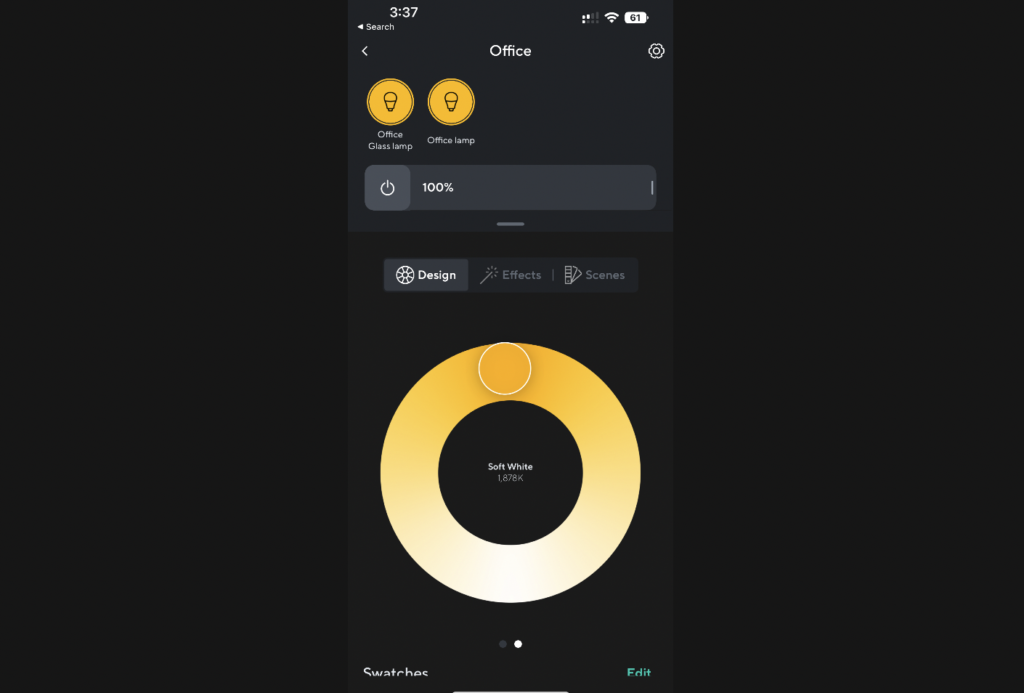 There’s also a custom light routine deemed the “sun match” mode that helps with sleeping and waking up since the light can mimic sunrise or sunset, and will change the colour temperature of the lights throughouts the day, from warmer golden sunrise in the morning to brighter bluer noon light at mid-day. This can make your space seem in tune with the natural light rhythms, which users report help them feel better throughout the day and sleep better at night.
With Wyze’s Bulb Colour, you can also create custom presents such as blue light, maximum bright, and warm light to match the setting. These can be activated with just one tap within the Wyze app, meaning the lighting in the room can immediately switch to fit the occasion.
White Light Controls
The bulb also features adjustable white light temperature control, which is useful if you want to make the mood in the room more or less relaxed. Easily toggling to a bluer, whiter light can make the environment brighter for more focused working, while a warmer level can make it feel more more relaxed.
I love smart lights for its ability to do stuff like this and I love using coloured lights to set a mode, or to help a space feel warmer or cooler. If your air conditioner isn’t cutting it, turning all your smart lights blue or purple can help a space seem and feel cooler. Similarly during the winter I like keeping my smart lights in the red orange yellow family to help me feel warm and cosy. The Wyze bulbs do a great job at providing a tonne of variety, with an easy user interface.
Power Loss Recovery
Reprogramming all of our electronics after a power outage can be quite a nuisance, but the Wyze Bulb Colour has a “Power Loss Recovery” setting that can be accessed in the Wyze app. This allows you to instruct the light to come back on when power is restored or go back to the last setting it was on before the power went out. The handy thing about this is that if your power goes out in the middle of the night, that doesn’t mean that all your smart lights will suddenly come blazing on when the power is restored.
Using the Bulb for Reminders/Alerts
 I have to admit, I don’t think I ever imagined my light bulbs could one day remind me to do certain chores or act as a security device, but here we are! Wyze Smart bulbs can be pre-set to use colour-based reminders so you don’t forget to do the laundry, feed the pets, prepare lunches, or do any other tasks you might forget about. The bulb is also made to work with other gadgets in the Wyze smart home environment, like motion sensors and door sensors, meaning you can be alerted by your lights about any unusual and out-of-the-ordinary movement around your home.
Vacation Mode
Another useful feature of the bulb is Vacation Mode, which you can set up through the app. If you are out of town, the bulb can adjust throughout the day and night to make it appear like someone is home, meaning your home may be less likely to get broken into while you’re gone.
If you already have Wyze’s Light Strip or Light Strip Pro, it can be synced with the Wyze Bulb Colour. The bulb will change colours to match music, fun for kids, or for a party.
Overall review: Wyze Bulb Color
Overall I think these bulbs are a super value and a great way to kick off your smart home. The colour and brightness on them is great quality and the app is very user-friendly and easy to use. You can also integrate your lightbulbs with a variety of other Wyze devices for a truly broad smart home. It’s also very convenient and cost-effective that there is no additional hub or bridge required and that the lights will work using Wi-Fi or Bluetooth and can be controlled inside the home or while you’re away. What are the downsides?
So far I haven’t found anything I really dislike about these bulbs. They’re affordable, capable, and easy to use so I can definitely recommend them for you whether you’re starting a smart home or adding to one.
The Wyze Bulb Colour can be purchased on the Wyze website in packs of two ($23USD), four ($46 USD), or six ($69USD), or you can get one ($16USD), two ($23USD), or four ($50USD) bulbs on Amazon.
**A note about Affiliate Links: TechGadgetsCanada & TechGadgetsInternational is supported by our readers. Occasionally I will include affiliate links in my reviews. I do this partly for convenience of the reader (since I’ll almost always include a link to the company website or similar anyway) in case you want to read more or purchase, but I also may get a small commission from the click, which helps me keep the blog running. If you choose to use this link I thank you greatly for supporting the blog. There’s no obligation or cost to you for us



