

 A portable projector can be a fun home accessory. With a portable projector you can turn any room into a media room, TV lounge or even take binge-watching outside. The Anker Nebula Capsule 3 portable laser projector is a compact new gadget that’s just landed in my test centre. In this video I’ll show you what makes the Nebula special, how bright it is, and I’ll also look at how it compares to another portable projector I recently reviewed; the Samsung Freestyle.
I’d like to thank Anker for sponsoring this post. Their support helps me keep the blog and the YouTube channel running and for that I’m grateful. Even though they are sponsoring this review, they have not told me what I have to say or what I can’t say about this projector, so you can consider these thoughts my own.
Anker Nebula Capsule 3
Summary
I have to say I’m surprised by the strength and capabilities of this little wireless projector. It’s very portable, it can create many image sizes from small to wall-filling. It comes with a built in battery, it’s bright, it sounds good and can be used as a portable speaker too and it’s a fun gadget for making a pop-up home theatre anywhere. I thought the Samsung Freestyle was pretty good. This is better.
Pros
- Excellent quality video
- Outstanding brightness, colour in full dark
- Good brightness in daylight
- Equally matched with Samsung Freestyle
- More affordable
- Portable
- Battery powered or use AC plug
- Doubles as portable speaker
Cons
- A bit heavy at 2 pounds/900g
- Battery life only 2.5 hours
Anker Nebula Capsule 3: review
This projector is an HD video projector with dual AC and battery power, meaning you can use it while plugged in, or wirelessly. It uses Wi-Fi to connect to streaming content via built-in Android TV, so you can watch TV and movies almost anywhere.
 In the box you get the cylindrical projector which is similar in size to a pint can. There’ a plug and USB-C cable for power and recharging, plus there’s a remote control with batteries included.
Ports & connections
Anker’s Nebula Capsule 3 projector is made to be wireless, but sometimes you just want to make a direct connection. For that reason, there’s an HDMI port in the rear so you can connect another streaming device, like an Apple TV, Blu-ray player, gaming device, or even your laptop, and get life sized images.
 There’s also an Aux port if you want to add an external speaker.
The UCB-C connection is for power but it can also be used for connecting a media player or hard drive.
Set up
Setting up the Anker Nebula projector is easy. Plug it in and let it get charged then just press the power button. Your projector will turn on and the screen will display instructions on how to pair your remote control so you can get going.
From there you’ll get some basic set up choices, including an option to pair your projector with an Android phone to share passwords and content if you want.
You can accept or skip this choice, then you’ll connect your home’s Wi-Fi network. I was online and connected with a functioning remote control in less than five minutes, so I was impressed with how easy it was to get going.
Key Features: Nebula Capsule 3 Projector
Laser brightness
 One of the most important factors for a portable projector is that it’s able to project a very bright image even when daylight or ambient light is a factor. I can say with confidence that there are not many projectors that can compete with a lot of light bleed. I recently reviewed the Samsung Freestyle projector and found that with any kind of ambient or daylight in the room the image was extremely washed out and not really visible.
So I was quite surprised the first time I fired up the Nebula projector. The brightness level is noticeably brighter than what I experienced with the Freestyle. I’ll put these projectors side by side and show you how they compare shortly but Anker says the Nebula is 1.8 times brighter than an LED light with the same wattage.
 Nebula uses laser light. Anker says the Nebula’s lasers are able to produce a brighter and more colourful image, and as a bonus, lasers don’t burn out nearly as soon as LED or old school light bulbs will.
Side by Side video comparison
To see how these projectors stack up, I set up the Nebula Capsule 3 projector next to the Samsung Freestyle projector. The Nebula image is on the left. As you can see … they are very closely matched.
 In a room with lots of light, they have a similar ability to compete.
In a dark room… again the Nebula is on the left and the Freestyle is on the right… you can see the images are clear, colourful and vibrant. The brighttness levels seem quite evenly matched
Video Quality
While we’re on the topic of brightness, let’s also talk about the overall video quality. This is an HD or high definition resolution video projector. Yes, you can get 4K or ultra high definition (UHD) projectors now too, but they do come at an extremely high cost.
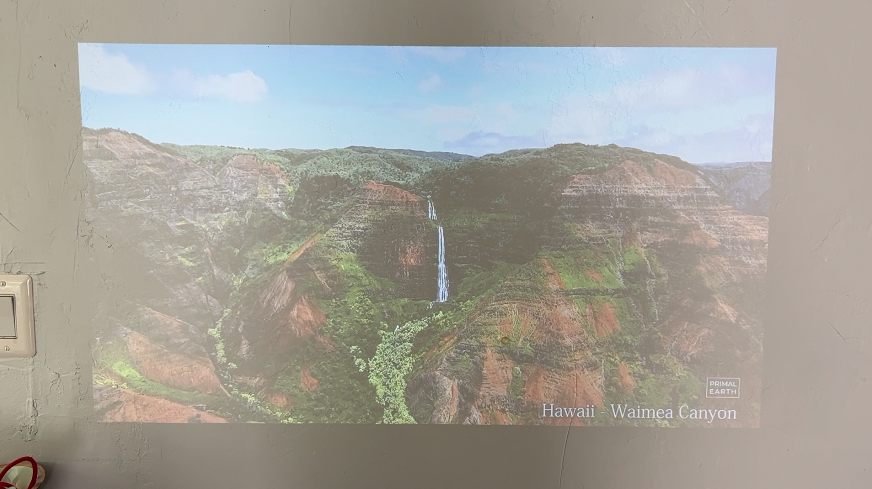
Video image with daylight in the room.
The HD video quality of this projector is really good. Video is clear and easy to see, and the colours appear bright, vibrant and true to life.
Portable
This projector is made to be portable. Its compact size and relatively light weight mean you can take it with you to a friend’s house or even use it outside. With a 2 1/2 hour video playback time on a single charge, that’s long enough to watch a movie under the stars if you want.
Autofocus & Keystone Correction
Older projectors often required you to manually adjust the focus every time you nudged the machine. Similarly, if you needed to project your image from off to the side or at an awkward angle, this would’ve required manual Keystone Correction. With the Nebula portable projector, both focus and keystone corrections happen automatically. Just place the projector where you want to use it and give it a moment to adjust. I also appreciate the black and white test pattern raphic that pops up while it’s adjusting, so I know the projector is working on it.
In my testing the projector was able to adapt to any number of situations. And conveniently, you can also use the remote control to make adjustments to the picture if you need more manual control.
Built in speaker
 If you’re truly going to use your projector for a portable movie night, it helps if you can hear the sound. While some projectors have extremely small internal speakers, or none at all (requiring you to connect a separate wireless speaker option), with the Nebula has a built-in 8-watt Dolby compatible speaker (the Freestyle by comparison has a 5 watt speaker).
Speaker sound quality
The Nebula projector’s speaker wraps across the back and sides of the device, so it’s able to project sound in a wider direction than some other projectors. The sound quality is surprisingly robust and it can even double as a portable speaker if you prefer putting on some tunes. If you kill the lighting array on it, you actually get longer battery life; using Nebula as a speaker-only you’ll have about 10 hours of battery life.
The speaker does lean a bit more to the high end of the soundstage, and I’d love a little more bass, but it’s quite a good speaker, given this is a projector not a hi-fi gadget.
Android TV interface
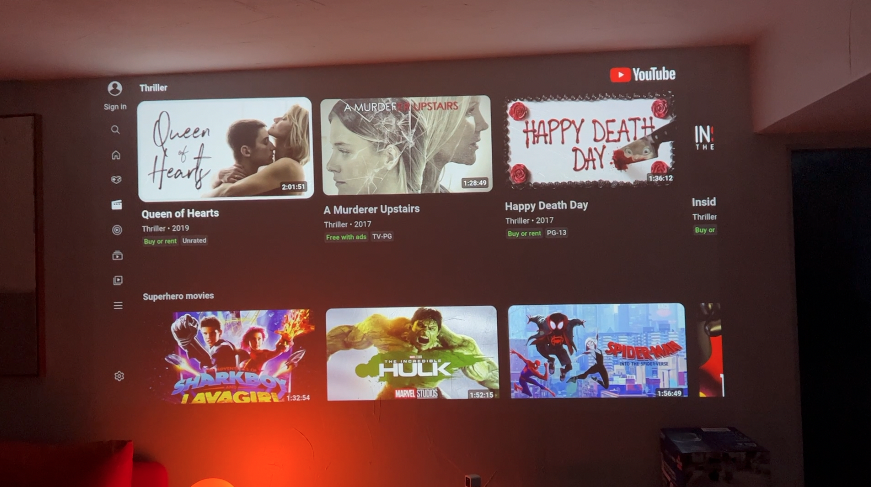
Android TV.
The Nebula projector uses Android TV 11.0 which will be familiar to some. If you’re more well versed in other TV operating systems, don’t worry, Android TV is very user friendly and easy to navigate. It comes with all the important streaming channels like Prime Video, YouTube and you can add other apps or channels too. As I mentioned earlier, if there’s a channel Android TV doesn’t have (Netflix is not available on here, for example) you can always connect another media streamer you might already have and prefer. You can also cast from an Android phone.
Using Nebula indoors in bright room
I will say, trying to use any projector in a very bright space is usually a struggle. Projectors are generally designed to be used in darker environments. Even so, with a portable projector, it helps if they have some ability to compete with ambient light so you truly can enjoy them anywhere.
 With that caveat aside, I was actually surprised by how noticeably bright Anker Nebula is even in a bright room.
I spent a few days using the Nebula in my living room which gets a substantial amount of daylight. While washout is always a concern, I feel that the Nebula was bright enough for me to enjoy watching TV.
Using Nebula in ideal conditions
In a dark room, Nebula shines, pun intended. In your media or gaming room, with low or no light, the image is beautifully sharp, defined and bright.
Battery and charging
I think we’ve noted this already, but for those of you who might be skimming this review, you’ll get 2 1/2 hours of video playback from the built-in 14,500 mAh battery, or 10 hours of audio-only, or use it connected to AC power for nonstop juice. The internal battery pack has fast charging capabilities so you can give it an extra boost quickly if you need to.

How does Anker Nebula compare to Samsung Freestyle?
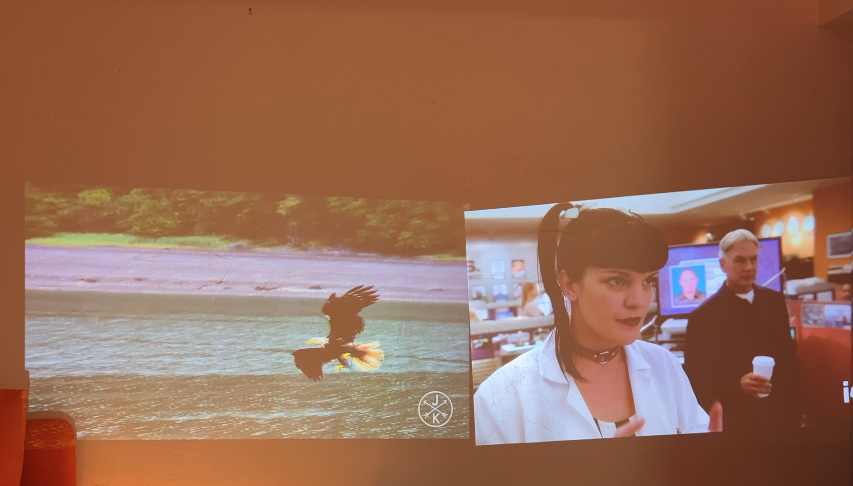
Nebula on Left, Freestyle on right.
We’ve touched on a few of these points throughout this review, but let’s recap how this projector stacks up against the Samsung Freestyle:
- Both projectors are portable HD video projectors with built in wireless streaming, a remote control and an HDMI port for external connections.
- Nebula’s speaker is 8 watts, while the Freestyle is 5.
- Nebula has a built in battery, while Freestyle makes you pay extra for that.
- Nebula is smaller and more compact than Freestyle (Nebula is 0.9 L while Freestyle clocks in at 1.7L.
- Finally when it comes to price, Anker Nebula’s MSRP is $799USD, while the Freestyle is $899US, and it requires you to pay extra if you want the battery option.
 When I reviewed the Samsung Freestyle I called it “almost perfect” and gave it 4.5 stars. Now that I’ve tried it head to head with the Anker Nebula, I can say the Nebula improves on the Freestyle substantially.
Overall review: Anker Nebula portable projector
Overall, I have to say I’m surprised by the strength and capabilities of this little wireless projector. It’s very portable, it can create many image sizes from small to wall-filling. It comes with a built in battery, it’s bright, it sounds good and can be used as a portable speaker too and it’s a fun gadget for making a pop-up home theatre anywhere.
Downsides? The battery may not be long-lasting enough for some, but since you can connect it to AC power any time you can probably work around it. It may also be a bit heavy to carry on you, since its weight is just under 2 pounds or 900g.
Even so, these are minor things that don’t detract from the overall usefulness of this projector. I can definitely recommend the Anker Nebula to you.
**A note about Affiliate Links: TechGadgetsCanada & TechGadgetsInternational is supported by our readers. Occasionally I will include affiliate links in my reviews. I do this partly for convenience of the reader (since I’ll almost always include a link to the company website or similar anyway) in case you want to read more or purchase, but I also may get a small commission from the click, which helps me keep the blog running. If you choose to use this link I thank you greatly for supporting the blog. There’s no obligation or cost to you for using these links. As an Amazon Associate I earn from qualifying purchases.



2 Comments
Nice article madam, i know everything about nabula capsule, i noted and identified many point, Thanks!!
Thanks for reviewing Anker Nebula Capsule 3. I see it is one of the smallest projectors I have ever seen. I think because of its portable profile; it is getting good popularity.