

 With the rise of mobile technology, it has become easier than ever to identify plants, diagnose plant diseases, and care for your garden, and that’s making gardening way more accessible and fun for newcomers. There are now numerous apps available for both iOS and Android devices that can help you with everything from plant identification to tracking the sun’s path. In this article, we’ll take a look at 10 of the best gardening and plant recognition apps, including Planta, Leafsnap, GardenAnswers, iNaturalist, Pl@ntNet, PictureThis, Plantix, What’s That Flower, Sun Seeker, and SmartPlant Home. See if you agree with our assessment of the best gardening apps, and let us know if you prefer one we missed.
PLUS there’s a couple of ways we’ve found to run plant recognition without a dedicated app. Read on to see how!
1. Planta
 Planta is a comprehensive app for plant recognition that offers a variety of features to help you keep your plants healthy. The app allows you to track watering and fertilizing schedules, set reminders, and receive personalized care advice based on the needs of each of your plants. Planta also includes a plant identification feature that allows you to snap a photo of a plant and receive information on its species and care requirements.
Pros:
- Easy to use interface
- Provides personalized care recommendations
- Offers reminders for watering and fertilizing
Cons:
- Limited plant database
- Requires a subscription for full access to features
Pricing: Planta offers a free version with limited features, as well as a premium version for $7.99/month or $35.99/year.
User Reviews: Planta has a rating of 4.7 out of 5 stars on the App Store and 4.4 out of 5 stars on Google Play.
2. Leafsnap
 Leafsnap is one of the best plant recognition app that uses image recognition technology to identify tree species based on their leaves. The app includes a database of trees found in the Northeastern United States, and it allows you to snap a photo of a leaf and receive information on the tree species.
Pros:
- Large plant database with detailed information
- Allows for easy plant identification
- Offers information on leaf arrangement, venation, and more
Cons:
- Limited to North American plants
- Occasional issues with plant identification accuracy
Pricing: Leafsnap is free to download and use.
User Reviews: Leafsnap has a rating of 4.3 out of 5 stars on the App Store and 3.9 out of 5 stars on Google Play.
3. GardenAnswers
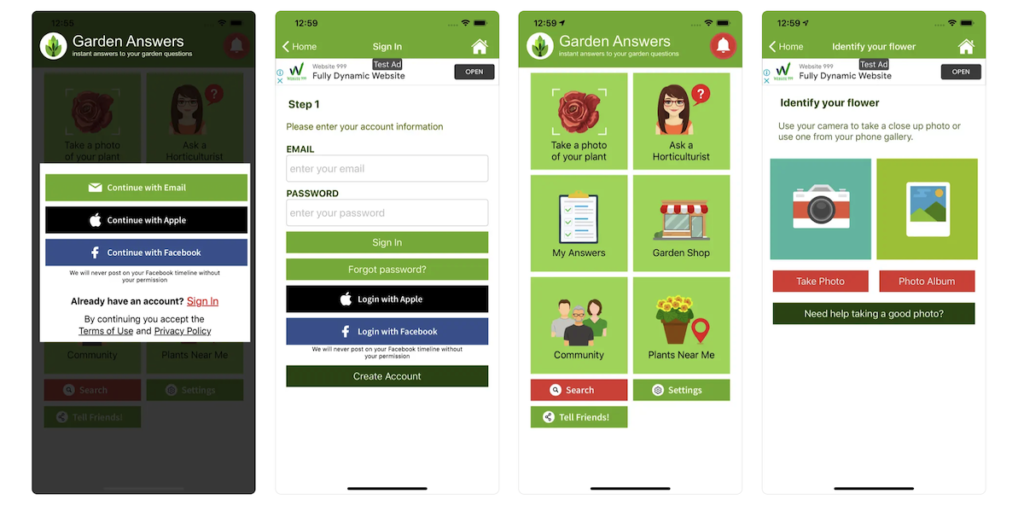 GardenAnswers stands out as a best plant identifier app that allows you to snap a photo of a plant and receive information on its species and care requirements. The app includes a database of over 20,000 plant species, and it provides information on each plant’s growth habits, soil requirements, and sunlight needs.
Pros:
- Offers plant identification through photo recognition
- Includes a plant database with care instructions
- Allows for questions to be asked to gardening experts
Cons:
- Requires an internet connection for use
- Some users report occasional bugs and glitches
Pricing: GardenAnswers is free to download and use.
User Reviews: GardenAnswers has a rating of 4.6 out of 5 stars on the App Store and 4.2 out of 5 stars on Google Play.
4. iNaturalist
 iNaturalist is a community science app that allows you to identify and document plants, animals, and other living things. This plant recognition app includes a database of over 400,000 species, and it allows you to upload photos and observations for others to see.
Pros:
- Large database of plants, animals, and fungi
- Allows for community identification of plants
- Provides information on species distribution and biodiversity
Cons:
- May be overwhelming for beginners
- Accuracy of identifications may vary
Pricing: iNaturalist is free to download and use.
User Reviews: iNaturalist has a rating of 4.9 out of 5 stars on the App Store and 4.6 out of 5 stars on Google Play.
5. Pl@ntNet
 Talking about best gardening app, Pl@ntNet is a strong centender that uses image recognition technology to identify plants. The app includes a database of over 20,000 plant species, and it allows you to snap a photo of a plant and receive information on its species and habitat. Pl@ntNet also includes a feature that allows you to participate in citizen science projects and contribute to the app’s database.
Pros:
- Large database of plant species with detailed descriptions
- Offers community identification of plants
- Provides information on plant ecology and distribution
Cons:
- Occasional issues with plant identification accuracy
- Some users report difficulty navigating the app interface
Pricing: Pl@ntNet is free to download and use.
User Reviews: Pl@ntNet has a rating of 4.3 out of 5 stars on the App Store and 4.4 out of 5 stars on Google Play.
6. PictureThis
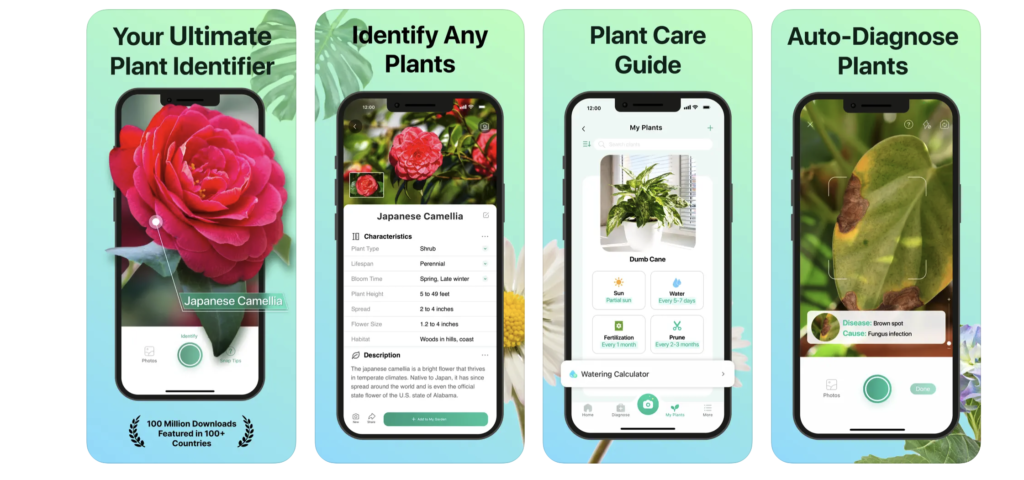 Anothere best plant identifier app is PictureThis . It uses image recognition technology to identify plants. The app includes a database of over 10,000 plant species, and it allows you to snap a photo of a plant and receive information on its species, care requirements, and common pests and diseases.
Pros:
- Easy to use plant identification through photo recognition
- Provides personalized care recommendations
- Offers a community forum for plant-related questions and discussions
Cons:
- Requires a subscription for full access to features
- Some users report issues with plant identification accuracy
Pricing: PictureThis offers a free version with limited features, as well as a premium version for $1.99/week or $19.99/year.
User Reviews: PictureThis has a rating of 4.7 out of 5 stars on the App Store and 4.6 out of 5 stars on Google Play.
7. Plantix
 Plantix is a plant identification and disease diagnosis app that allows you to snap a photo of a plant and receive information on its species and any diseases or pests affecting it. The app includes a database of over 20,000 plant species and offers personalized care advice based on the needs of each plant.
Pros:
- Offers plant identification through photo recognition
- Provides personalized pest and disease management advice
- Allows for monitoring of plant health and growth
Cons:
- Limited to pest and disease identification
- May not be suitable for novice gardeners
Pricing: Plantix is free to download and use, but some features require in-app purchases.
User Reviews: Plantix has a rating of 4.8 out of 5 stars on the App Store and 4.4 out of 5 stars on Google Play.
8. What’s That Flower
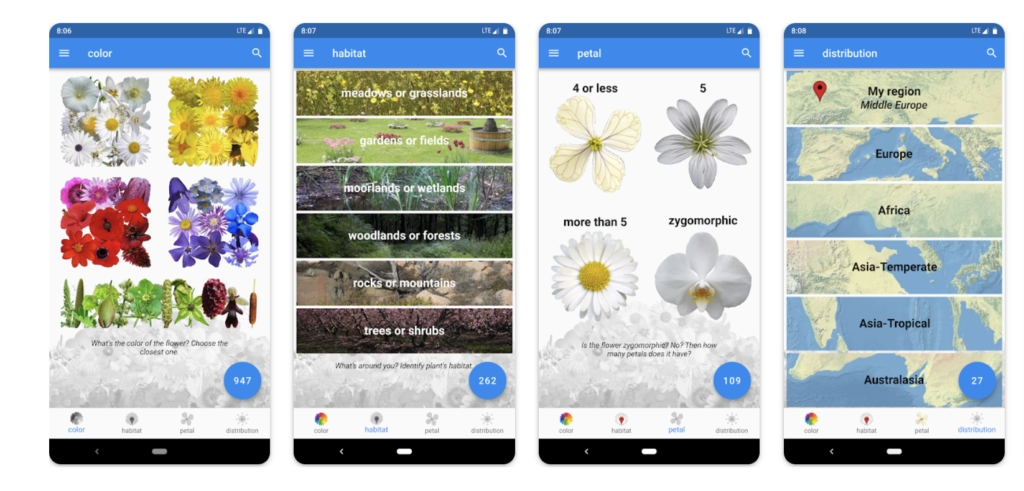 What’s That Flower is a plant identification app that uses image recognition technology to identify flowers. The app includes a database of over 5,000 flower species and allows you to snap a photo of a flower and receive information on its species and care requirements.
Pros:
- Easy to use plant identification through photo recognition
- Provides detailed information on flower species
- Offers community identification of plants
Cons:
- Limited to flower identification
- Some users report issues with plant identification accuracy
Pricing: What’s That Flower is free to download and use.
User Reviews: What’s That Flower has a rating of 4.7 out of 5 stars on the App Store and 4.6 out of 5 stars on Google Play.
9. Sun Seeker – Tracker & Compass
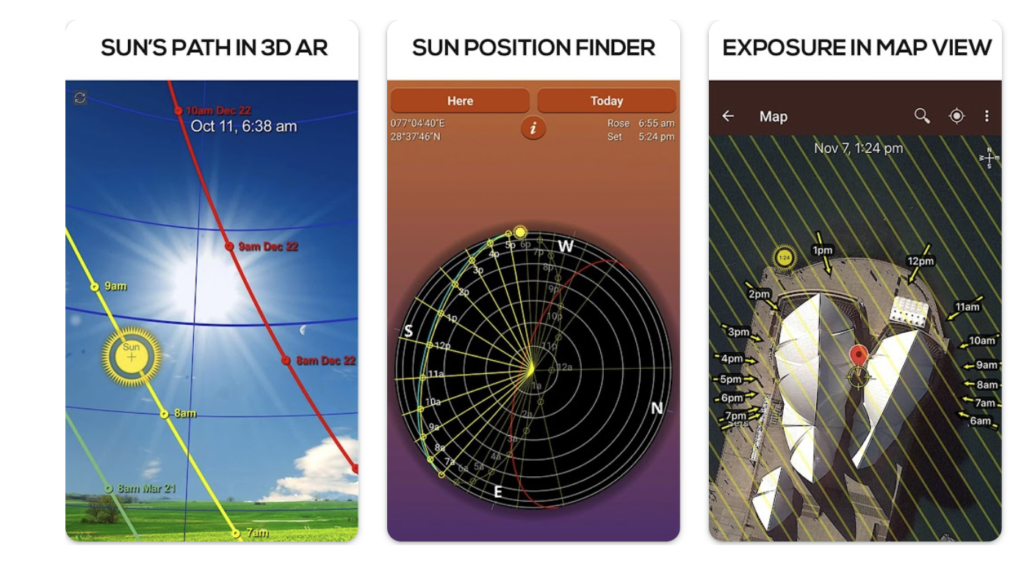 Sun Seeker is a tracking app that allows you to track the path of the sun throughout the day. The app includes a 3D compass and interactive map that shows you the sun’s path in real-time, as well as information on sunrise, sunset, and twilight times.
Pros:
- Allows for tracking of sun and moon positions
- Provides information on sunrise, sunset, and twilight times
- Offers 3D augmented reality mode for easy visualization
Cons:
- Limited to sun and moon tracking features
- May not be suitable for novice gardeners
Pricing: Sun Seeker is available for $9.99 on the App Store and $7.49 on Google Play.
User Reviews: Sun Seeker has a rating of 4.8 out of 5 stars on the App Store and 4.4 out of 5 stars on Google Play.
10. SmartPlant Home
 In our list of best gardening apps, the last name is SmartPlant Home . It offers personalized plant care advice based on the needs of each plant. The app includes a database of over 20,000 plant species and allows you to track the growth and health of your plants. SmartPlant Home also includes a feature that allows you to ask plant care questions and receive answers from horticulture experts.
Pros:
- Comprehensive plant care features
- Provides personalized care advice
- Offers expert plant care support
Cons:
- Some users report occasional bugs
- Requires a subscription for access to all features
Pricing: SmartPlant Home offers a free version with limited features, as well as a premium version for $4.99/month or $29.99/year.
User Reviews: SmartPlant Home has a rating of 4.8 out of 5 stars on the App Store and 4.3 out of 5 stars on Google Play.
Whether you’re a seasoned gardener or just starting out, these 10 gardening and plant recognition apps can help you identify plants, track the sun’s path, receive personalized plant care advice, and more. Each app has its own unique features and benefits, so it’s important to choose the one that best meets your needs. With the help of these apps, you can take your gardening skills to the next level and enjoy a thriving garden full of healthy, beautiful plants.
How to use tools already on your phone for plant & garden help
BONUS pick: Reverse Google image search it!
While you can certainly download one of these apps and try it out, one of the easiest ways to figure out what a plant is, and whether it’s a weed or a keeper is to simply use Google Image or Reverse Image search to figure out what the plant is. We have full instructions here on the website about how exactly to use a photo to search Google images to help identify a plant.
Now, since running a Google image search does take a few extra steps we have found yet another great and extremely easy way to identify a plant, leaf, tree, or flower in your garden.
BONUS pick: How to identify a plant photo on an iPhone? iPhone Visual Lookup
Apple has added a special new feature to its photos system. By taking a picture of whatever you were trying to identify; whether that is a plant, animal, or other random object, Apple’s built-in software can help you figure it out without you, needing to do any uploading, transferring, or app downloading.
The iPhone Visual Lookup feature opens right inside your photos app and is designed to give you information about almost anything. Just take a photo and open it in your Apple Photos app. Tap on the photo and look for the small “i”. When you tap it you get an option to look up more info on whatever it is. it’ works like a charm!



